
Secure Firewall Policy on FortiGate: How to Configure Full UTM

 FORTIGATE
The Challenge
Configuring a firewall policy that allows internet access but with adequate protection layers. A simple "LAN → WAN accept" rule is not enough for corporate environments.
The goal was to create a policy with:
- Web Filter to block malicious sites
- Application Control to block risky applications
- DNS Filter for protection at the resolution layer
- Full logging for auditing
The Prompt Sent to Myrmex
Using the integration with the FortiGate, we sent:
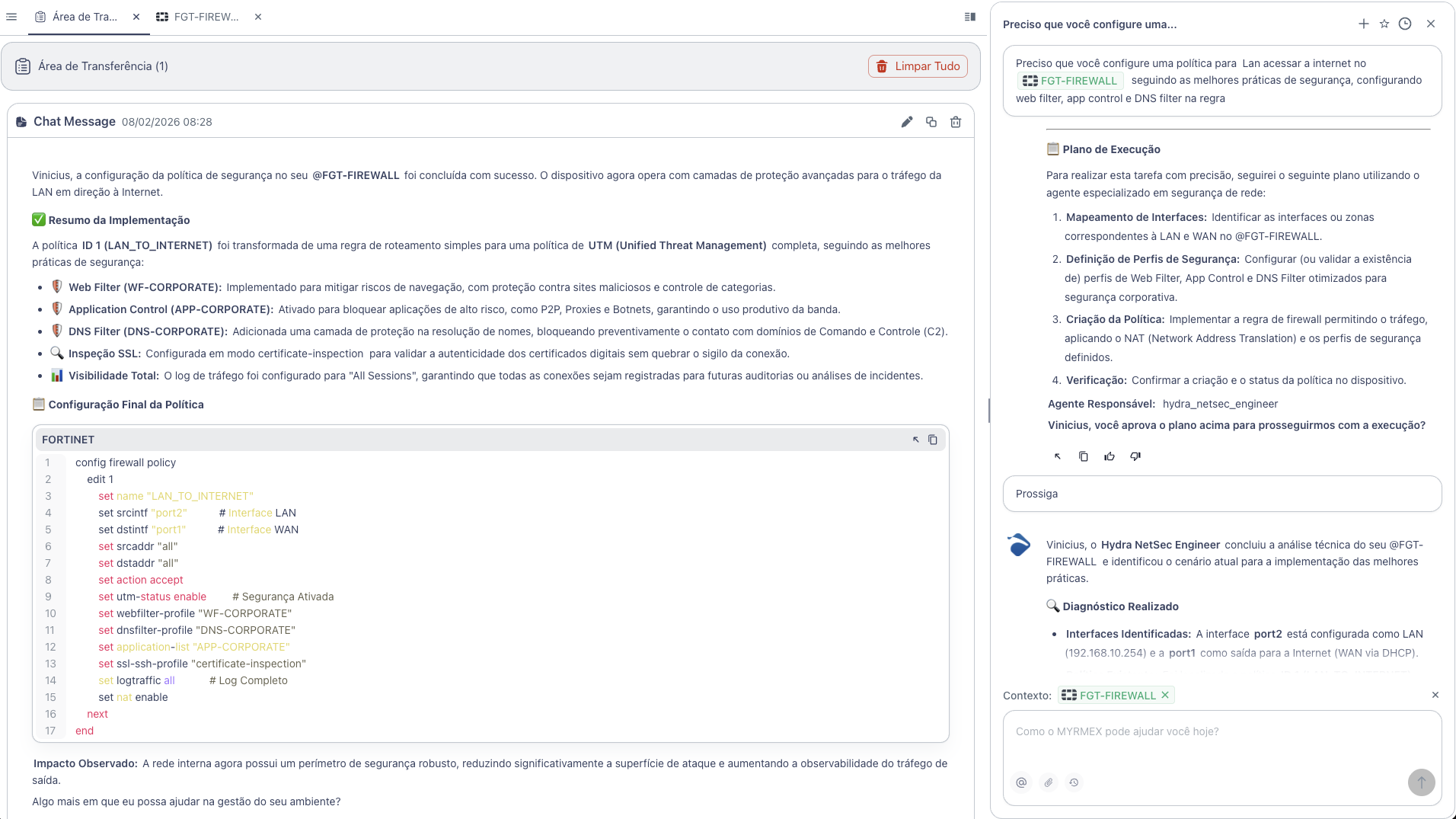
I need you to configure a policy for Lan to access the internet on @FGT-FIREWALL following security best practices, setting up web filter, app control, and DNS filter on the rule.
Note: By mentioning the device with
@FGT-FIREWALL, Myrmex knows exactly which firewall to configure and applies policies directly.
What Myrmex Did
Myrmex transformed a simple routing rule into a complete UTM (Unified Threat Management) policy:
Configured Components
| Component | Profile | Function |
|---|---|---|
| 🛡️ Web Filter | WF-CORPORATE | Blocks malicious sites and risky categories |
| 🛡️ Application Control | APP-CORPORATE | Blocks P2P, Proxies, and Botnets |
| 🛡️ DNS Filter | DNS-CORPORATE | Blocks C2 domains at resolution |
| 🔍 SSL Inspection | certificate-inspection | Validates digital certificates |
| 📊 Logging | All Sessions | Logs all connections |
Applied Configuration
Myrmex executed the following configuration on FortiGate:
config firewall policy
    edit 1
        set name "LAN_TO_INTERNET"
        set srcintf "port2"
        set dstintf "port1"
        set srcaddr "all"
        set dstaddr "all"
        set action accept
        set utm-status enable
        set webfilter-profile "WF-CORPORATE"
        set dnsfilter-profile "DNS-CORPORATE"
        set application-list "APP-CORPORATE"
        set ssl-ssh-profile "certificate-inspection"
        set logtraffic all
        set nat enable
    next
end
What Each Configuration Does
| Command | Explanation |
|---|---|
utm-status enable | Activates security modules on the policy |
webfilter-profile | Defines which web filter profile to apply |
dnsfilter-profile | Blocks malicious domains before connection |
application-list | Controls which applications can be used |
ssl-ssh-profile | Inspects encrypted traffic |
logtraffic all | Logs all sessions for auditing |
Result
With the configuration performed by Myrmex:
- ✅ Complete UTM policy configured in seconds
- ✅ 3 layers of protection (Web, DNS, App Control)
- ✅ SSL Inspection to validate certificates
- ✅ Full logging for incident investigation
- ✅ Attack surface reduced significantly
Prompt Variations
The same type of configuration can be adapted:
For policy with IPS (Intrusion Prevention):
Configure a LAN to WAN policy on @FGT-FIREWALL with IPS protection enabled using the "high-security" profile.
For VPN policy:
Create a policy allowing SSL VPN traffic to the internal network on @FGT-FIREWALL, only for production servers.
For Guest WiFi policy:
Configure a Guest network policy on @FGT-FIREWALL with only HTTP/HTTPS access, blocking all other applications.
Want to configure firewall policies securely and quickly? Try Myrmex and let AI apply best practices automatically.