
CIS Benchmark Audit on Ubuntu: How to Identify Vulnerabilities on the Server

 UBUNTU
The Challenge
A production Ubuntu server needs to be compliant with recognized security standards. But how do you know if the settings are adequate?
The goal was to perform a complete security audit based on the CIS Benchmark, identifying:
- Disabled audit services
- Pending security updates
- Vulnerable network configurations
- Inadequate access policies
The Prompt Sent to Myrmex
Using the integration with the Ubuntu server, we sent:
I need you to perform an audit based on the CIS Benchmark for @ANX-SRV-01 analyzing the most important points of Ubuntu.

It should return a table with the status, what was identified, and how to fix it, in order of impact and priority.
Note: By mentioning the server with
@ANX-SRV-01, Myrmex knows exactly which equipment to audit and executes the necessary commands to validate each item.
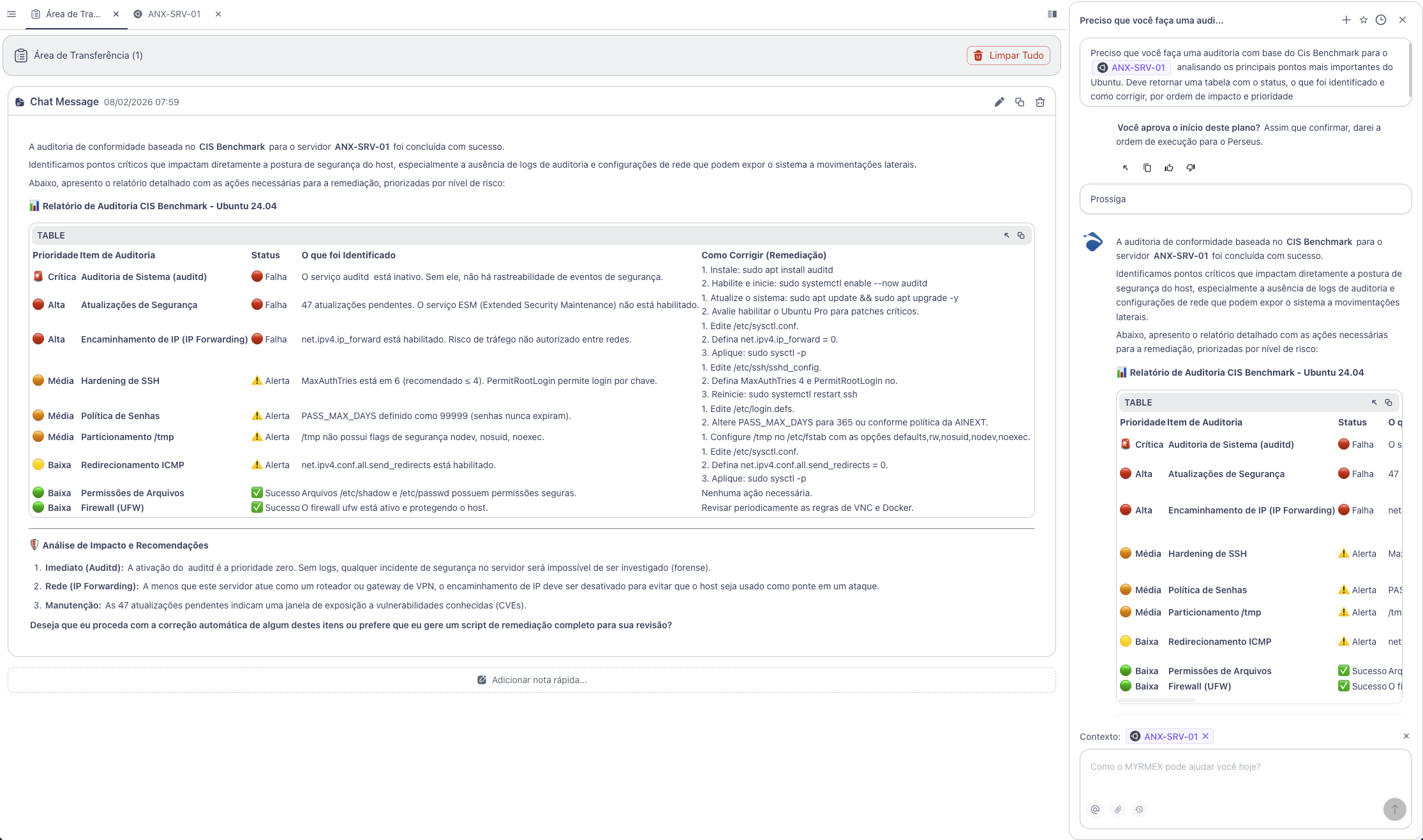
What Myrmex Found
Myrmex executed a complete analysis based on the CIS Benchmark for Ubuntu 24.04 and returned the following report:
Audit Summary
| Priority | Audit Item | Status |
|---|---|---|
| 🚨 Critical | System Audit (auditd) | 🔴 Failed |
| 🔴 High | Security Updates | 🔴 Failed |
| 🔴 High | IP Forwarding | 🔴 Failed |
| 🟠 Medium | SSH Hardening | ⚠️ Warning |
| 🟠 Medium | Password Policy | ⚠️ Warning |
| 🟠 Medium | /tmp Partitioning | ⚠️ Warning |
| 🟡 Low | ICMP Redirect | ⚠️ Warning |
| 🟢 Low | File Permissions | ✅ Success |
| 🟢 Low | Firewall (UFW) | ✅ Success |
Identified Vulnerabilities
🚨 Auditd Inactive (Critical)
Problem: The auditd service is inactive. Without it, there is no traceability of security events - any incident will be impossible to investigate.
Myrmex Fix:
# Install audit service
sudo apt install auditd

# Enable and start
sudo systemctl enable --now auditd
🔴 47 Pending Updates (High)
Problem: The system has 47 pending security updates, creating an exposure window to known vulnerabilities (CVEs).
Myrmex Fix:
# Update system
sudo apt update && sudo apt upgrade -y
🔴 IP Forwarding Enabled (High)
Problem: net.ipv4.ip_forward is enabled. Unless the server acts as a router, this allows unauthorized traffic between networks.
Myrmex Fix:
# Edit kernel configuration
sudo sed -i 's/net.ipv4.ip_forward = 1/net.ipv4.ip_forward = 0/' /etc/sysctl.conf

# Apply changes
sudo sysctl -p
⚠️ SSH Hardening (Medium)
Problem: MaxAuthTries is set to 6 (recommended ≤ 4) and PermitRootLogin allows key-based login.
Myrmex Fix:
# Edit SSH configuration
sudo sed -i 's/#MaxAuthTries 6/MaxAuthTries 4/' /etc/ssh/sshd_config
sudo sed -i 's/PermitRootLogin prohibit-password/PermitRootLogin no/' /etc/ssh/sshd_config

# Restart service
sudo systemctl restart ssh
⚠️ Password Policy (Medium)
Problem: PASS_MAX_DAYS set to 99999 - passwords never expire.
Myrmex Fix:
# Set password expiration to 365 days
sudo sed -i 's/PASS_MAX_DAYS\t99999/PASS_MAX_DAYS\t365/' /etc/login.defs
Strong Points Identified
Myrmex also highlighted the settings that were already adequate:
- ✅ File permissions -
/etc/shadowand/etc/passwdwith secure permissions - ✅ UFW Firewall - Active and protecting the host
Result
With the audit performed by Myrmex:
- ✅ 3 critical/high vulnerabilities identified
- ✅ 4 attention points mapped for improvement
- ✅ 2 secure configurations confirmed
- ✅ Fix commands ready to apply
Myrmex offered to generate a single remediation script to apply all fixes automatically.
Prompt Variations
The same type of audit can be adapted:
For SSH-focused audit:
Audit only the SSH settings of @ANX-SRV-01 based on the CIS Benchmark. Check encryption, authentication, and permissions.
To check active services:
List all services running on @ANX-SRV-01 and identify which are not essential and should be disabled.
For multiple servers:
Compare CIS Benchmark compliance between @ANX-SRV-01 and @ANX-SRV-02. Show differences and which is more secure.
Want to ensure your servers are compliant? Try Myrmex and let AI automatically audit your infrastructure.