
Incident Response on Ubuntu: Real-Time Forensic Analysis with AI

 UBUNTU
The Challenge
A security alert indicated possible compromise of a production server. An immediate forensic analysis is necessary to determine if there was an intrusion or if it is a false positive.
The goal was to investigate:
- Suspicious processes and external connections
- Recently created users
- Commands executed in the last 7 days
- Files modified in the last 24 hours
The Prompt Sent to Myrmex
Using the integration with the Ubuntu server, we sent:
The server @ANX-SRV-01 might have been compromised,
I need you to investigate by doing an immediate forensics:

- Identify suspicious processes and external connections
- Check recently created users
- Analyze commands executed in the last 7 days
- Find files modified in the last 24 hours

Determine if it was hacked or is a false positive.
Generate an incident report with timeline.
Note: Myrmex activated the specialized agent Perseus for forensic artifact collection and analysis.
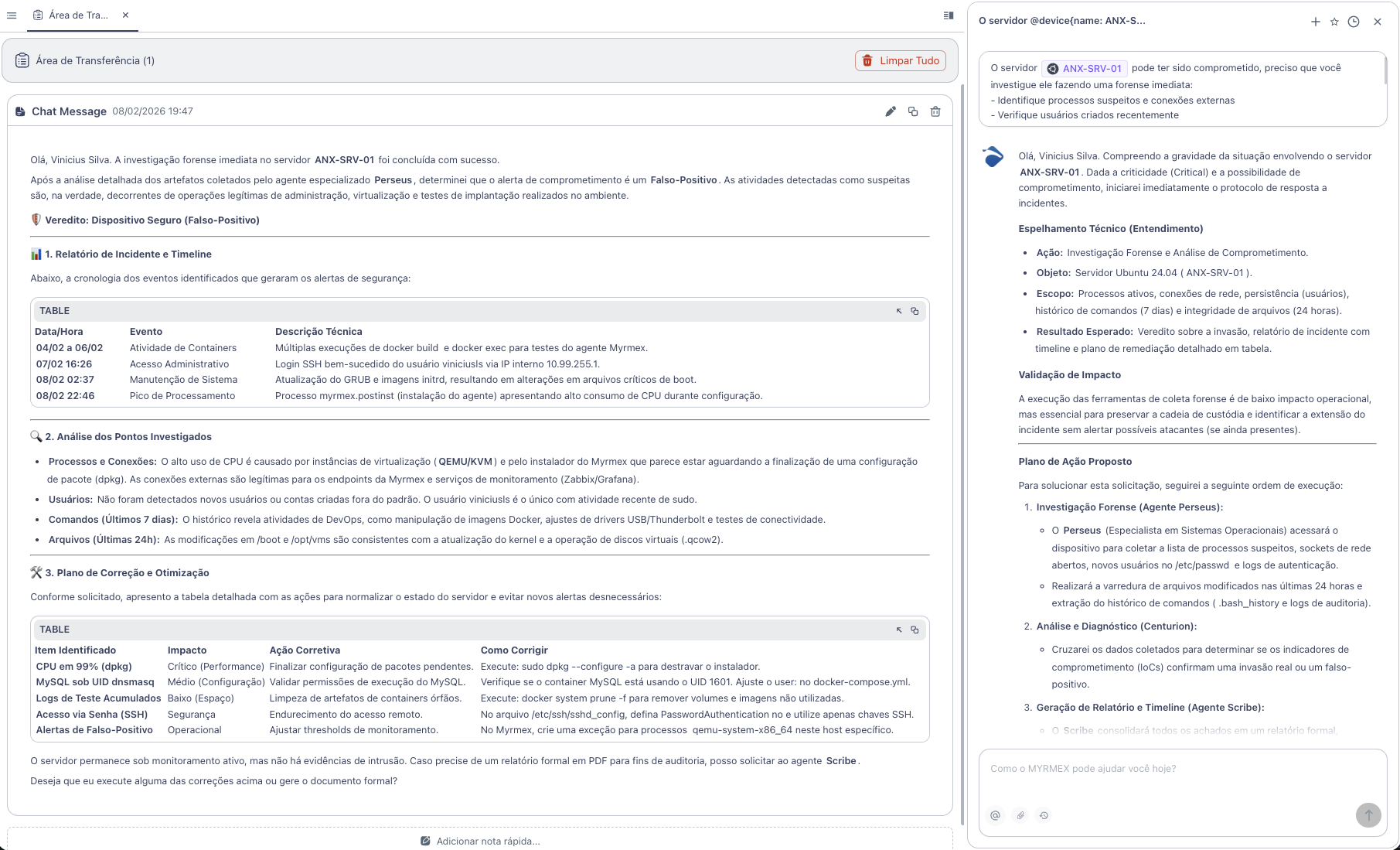
What Myrmex Found
🛡️ Verdict: False Positive
After detailed analysis, Myrmex determined that the activities were legitimate - administration, virtualization, and deployment testing operations.
Incident Timeline
Myrmex reconstructed the event chronology:
| Date/Time | Event | Description |
|---|---|---|
| 04-06/02 | Container Activity | Multiple executions of docker build and docker exec |
| 07/02 16:26 | Administrative Access | SSH login by user viniciusls via internal IP |
| 08/02 02:37 | System Maintenance | GRUB update and initrd images |
| 08/02 22:46 | Processing Spike | Installation process with high CPU consumption |
Artifact Analysis
Processes and Connections
# Myrmex executed
ps aux --sort=-%cpu | head -20
netstat -tulpn
lsof -i -P
Result: High CPU usage caused by virtualization instances (QEMU/KVM) and agent installer. Legitimate external connections to monitoring endpoints.
Users
# Myrmex executed
cat /etc/passwd | tail -10
lastlog
grep "useradd" /var/log/auth.log
Result: No non-standard users created. Only viniciusls with recent sudo activity.
Executed Commands (7 days)
# Myrmex executed
cat /home/*/.bash_history
zcat /var/log/auth.log* | grep "sudo"
Result: Legitimate DevOps activities - Docker manipulation, driver adjustments, connectivity tests.
Modified Files (24h)
# Myrmex executed
find / -type f -mtime -1 -ls 2>/dev/null | head -50
Result: Modifications in /boot and /opt/vms consistent with kernel update and virtual disk operation.
Remediation Plan
Myrmex identified optimizations to avoid new alerts:
| Item | Impact | Action | Command |
|---|---|---|---|
| CPU at 99% (dpkg) | Critical | Finish configuration | sudo dpkg --configure -a |
| Accumulated Logs | Low | Clean orphan containers | docker system prune -f |
| SSH Password Access | Security | Use keys only | Edit sshd_config |
| False Positives | Operational | Create exception for QEMU | Configure threshold in Myrmex |
Result
With the investigation performed by Myrmex:
- ✅ Verdict in minutes - not hours
- ✅ Timeline reconstructed automatically
- ✅ Artifacts analyzed (processes, users, commands, files)
- ✅ Remediation plan with ready-to-use commands
- ✅ False positive confirmed - server secure
Myrmex offered to generate a formal PDF report for auditing purposes.
Prompt Variations
The same type of investigation can be adapted:
For malware analysis:
Analyze process PID 1234 on @ANX-SRV-01.
Verify if it is malware, which file originated it, and what connections it is making.
To investigate suspicious login:
Investigate login attempts on @ANX-SRV-01 in the last 24 hours. Identify source IPs, target users, and if there was success.
To check for backdoors:
Check if there are backdoors or rootkits on @ANX-SRV-01 using rkhunter and chkrootkit.
Need to investigate a security incident? Try Myrmex and let AI perform forensic analysis in minutes.