
Security Audit on FortiGate: How to Automatically Identify Vulnerabilities

 FORTIGATE
The Challenge
A production FortiGate needs to be configured following security best practices. But how do you know if the settings are adequate?
The goal was to perform a complete security audit, identifying:
- Administrative users and password policies
- Insecure services enabled (Telnet, HTTP)
- Management access restrictions
- Firmware versions and signatures
The Prompt Sent to Myrmex
Using the integration with the FortiGate, we sent:
Perform a security audit on @FGT-FIREWALL
based on best practices.

Check:
- Administrative users and passwords
- Enabled services (HTTPS, SSH, Telnet, SNMP)
- Management access (trusted hosts)
- FortiOS version and signatures
- Enabled logs

For each item: Status (Secure, Warning, Critical), current configuration, and fix command if necessary.
Note: By mentioning the device with
@FGT-FIREWALL, Myrmex knows exactly which firewall to audit and executes the necessary commands.
What Myrmex Found
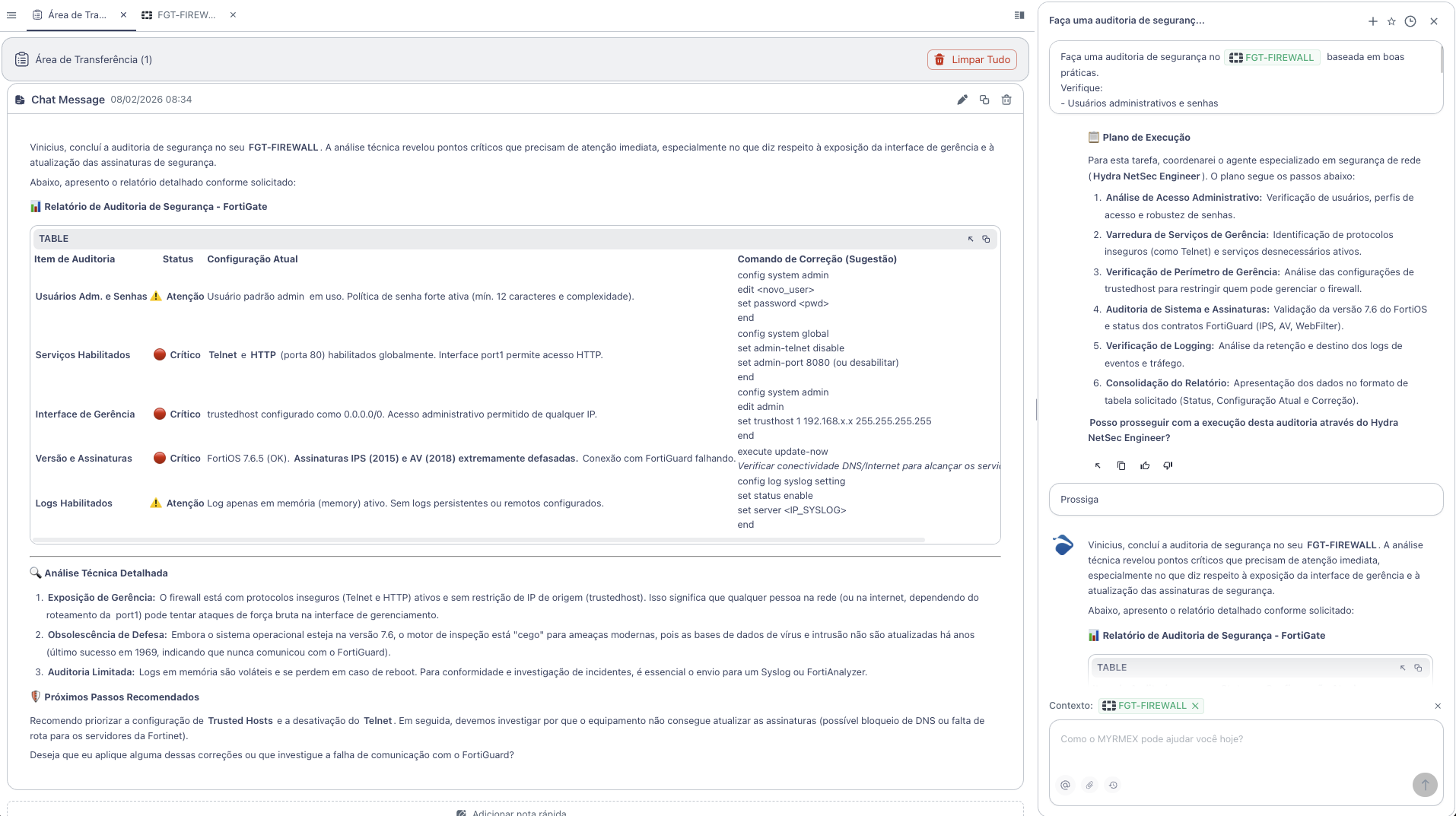
Myrmex executed a complete analysis and returned the following report:
Audit Summary
| Audit Item | Status |
|---|---|
| Adm. Users and Passwords | ⚠️ Warning |
| Enabled Services | 🔴 Critical |
| Management Access (Trusted Hosts) | 🔴 Critical |
| Version and Signatures | 🔴 Critical |
| Enabled Logs | ⚠️ Warning |
Identified Vulnerabilities
🔴 Telnet and HTTP Enabled (Critical)
Problem: Telnet and HTTP (port 80) are enabled globally. Insecure protocols that transmit data in plain text.
Myrmex Fix:
config system global
    set admin-telnet disable
    set admin-port 8080
end
🔴 Trusted Hosts without Restriction (Critical)
Problem: trustedhost configured as 0.0.0.0/0. Administrative access allowed from any IP - exposes the firewall to brute force attacks.
Myrmex Fix:
config system admin
    edit admin
        set trusthost1 192.168.x.x 255.255.255.255
    next
end
🔴 Outdated Signatures (Critical)
Problem: FortiOS 7.6.5 (OK), but IPS (2015) and AV (2018) signatures extremely outdated. Connection to FortiGuard failing.
Myrmex Fix:
execute update-now
Note: Verify DNS/Internet connectivity to reach FortiGuard servers.
⚠️ Default Admin User (Warning)
Problem: Default user admin in use. Although a strong password policy is active, the default username is a common target for attacks.
Myrmex Fix:
config system admin
    edit new_admin
        set password <strong_password>
        set accprofile super_admin
    next
end
⚠️ Logs Only in Memory (Warning)
Problem: Log only in memory (memory) active. Logs are lost in case of reboot, hindering investigations.
Myrmex Fix:
config log syslogd setting
    set status enable
    set server <IP_SYSLOG>
end
Result
With the audit performed by Myrmex:
- ✅ 3 critical vulnerabilities identified
- ✅ 2 attention points mapped
- ✅ Fix commands ready to apply
- ✅ Next steps prioritized
Myrmex offered to investigate the communication failure with FortiGuard and apply fixes automatically.
Prompt Variations
The same type of audit can be adapted:
To check firewall policies:
Audit the firewall policies of @FGT-FIREWALL.
Identify permissive, duplicate, or unused rules.
To check VPN:
Audit the SSL VPN settings of @FGT-FIREWALL.
Check encryption, authentication, and session timeout.
For multiple devices:
Compare the security configuration between
@FGT-FIREWALL-01 and @FGT-FIREWALL-02. Show differences.
Want to identify vulnerabilities in your firewall? Try Myrmex and let AI automatically audit your infrastructure.