
Security Audit on MikroTik: How to Automatically Identify Vulnerabilities

 MIKROTIK
The Challenge
A production MikroTik router needs to be protected against threats. But how do you know if the security settings are adequate?
The goal was to perform a complete security audit based on recognized standards (CIS Benchmark), identifying:
- Users with excessive permissions
- Unnecessary services enabled
- Vulnerable firewall configurations
- Outdated firmware versions
The Prompt Sent to Myrmex
Using the integration with the MikroTik router, we sent:
Perform a security audit on
@MKT-ROUTER-01 based on the CIS Benchmark.

Check:
Users and passwords
Enabled services (telnet, ssh, api, winbox, web)
Firewall rules and input policy
Recursive DNS and NTP
RouterOS version and updates
Enabled logs.

For each item: Status (Secure, Warning, Critical), current configuration, and fix command if necessary.
Note: With just one line, Myrmex knows exactly which equipment to audit and which points to check.
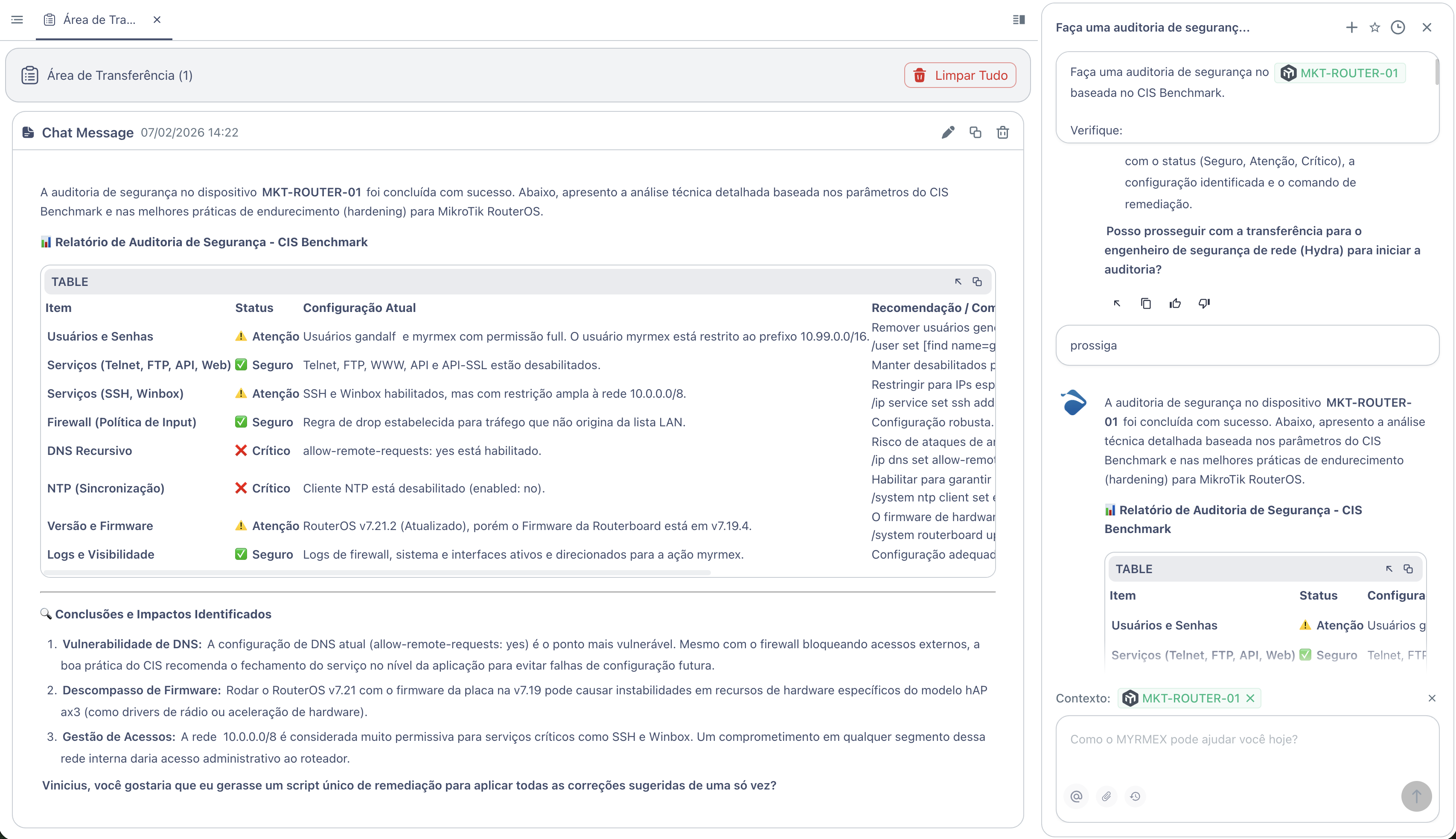
What Myrmex Found
Myrmex executed a complete analysis based on the CIS Benchmark and returned the following report:
Audit Summary
| Item | Status | Current Configuration |
|---|---|---|
| Services (Telnet, FTP, API, Web) | ✅ Secure | Telnet, FTP, WWW, API and API-SSL disabled |
| Firewall (Input Policy) | ✅ Secure | Drop rule for traffic outside the LAN list |
| Logs and Visibility | ✅ Secure | Firewall and system logs directed to monitoring |
| Users and Passwords | ⚠️ Warning | Users with full permission without IP restriction |
| Services (SSH, Winbox) | ⚠️ Warning | Enabled, but with broad restriction (10.0.0.0/8) |
| Version and Firmware | ⚠️ Warning | RouterOS v7.21.2, but board firmware on v7.19.4 |
| Recursive DNS | ❌ Critical | allow-remote-requests=yes enabled |
| NTP (Synchronization) | ❌ Critical | NTP client disabled |
Identified Vulnerabilities
❌ Open Recursive DNS (Critical)
Problem: The allow-remote-requests=yes setting allows the router to answer DNS queries from any source, creating a risk of amplification attacks.
Myrmex Fix:
/ip dns set allow-remote-requests=no
❌ NTP Disabled (Critical)
Problem: Without time synchronization, log timestamps become incorrect, hindering security investigations.
Myrmex Fix:
/system ntp client set enabled=yes servers=pool.ntp.br
⚠️ Services with Broad Access
Problem: SSH and Winbox allow access from the entire 10.0.0.0/8 network. A compromise in any segment would give administrative access.
Myrmex Fix:
/ip service set ssh address=IP_ADMIN/32
/ip service set winbox address=IP_ADMIN/32
⚠️ Outdated Firmware
Problem: RouterOS v7.21 running with hardware firmware on v7.19.4 can cause instabilities.
Myrmex Fix:
/system routerboard upgrade
# Requires reboot after command
⚠️ Users without IP Restriction
Problem: User gandalf with full permission without source restriction.
Myrmex Fix:
/user set [find name=gandalf] address=X.X.X.X/32
Strong Points Identified
Myrmex also highlighted the settings that were already adequate:
- ✅ Telnet, FTP, WWW, API disabled - Reduced attack surface
- ✅ Firewall with drop policy - Unauthorized traffic is blocked by default
- ✅ Centralized logs - Proper monitoring for auditing purposes
Result
With the audit performed by Myrmex:
- ✅ 2 critical vulnerabilities identified (DNS and NTP)
- ✅ 3 attention points mapped for improvement
- ✅ 3 secure configurations confirmed
- ✅ Fix commands ready to apply
Myrmex offered to generate a single remediation script to apply all fixes at once.
Prompt Variations
The same type of audit can be adapted:
For Firewall-focused audit:
Audit only the firewall rules of @MKT-ROUTER-01. Identify permissive, duplicate within unused rules.
To check compliance with internal policy:
Verify if @MKT-ROUTER-01 is compliant with: SSH key-only, logs to remote syslog, automatic backup enabled.
For multiple devices:
Compare the security configuration between @MKT-ROUTER-01 and @MKT-ROUTER-02. Show differences.
Want to identify vulnerabilities before they are exploited? Try Myrmex and let AI automatically audit your infrastructure.