
Vital Signs: Understanding Status and Dependencies in Myrmex

On an airplane's dashboard, lights indicate the health of critical systems. At Myrmex, we adopt the same philosophy: Immediate Visual Information.
As you navigate through your directory or workspace, you'll notice a "color language" in the dots next to each device or integration. Understanding this code is vital to keeping your operation healthy.
The Color Code
Our status indicators are simple, direct, and universal:
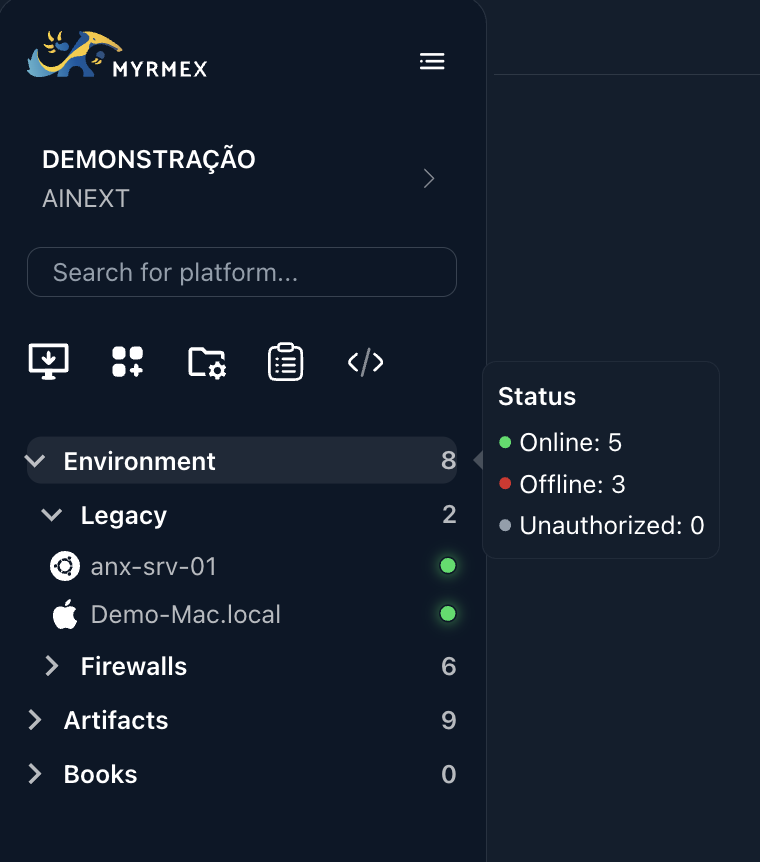
- 🟢 Green (Online): The heart is beating. The device is communicating with the Myrmex cloud and responding to heartbeats noramlly.
- 🔴 Red (Offline): Loss of signal. The device has stopped responding. This could indicate an internet outage, the agent service stopped, or the server powered down.
- ⚪ White/Grey (Unauthorized): Limbo. The agent was installed and contacted the cloud, but has not yet been authorized by an admin to join your organization.
Where to Find Them?
We've placed these vital signs strategically:
- Directory: Next to the icon of each item.
- Folder Summary: Hovering over a folder's counters gives you an X-ray of how many items are healthy or critical inside.
- Detail (Pulsing Effect): When opening a device card, the status isn't static. It pulses, reminding you that the connection is alive and monitored in real-time.
The DOMINO Effect: Agent Dependency
Here is the golden rule of the Myrmex ecosystem: The Integration lives in the Agent.
Many users get scared when they see an integration (e.g., AWS, Firewall) go Offline (Red) and think: "Is my AWS account down?".
Usually, the answer is no.
Remember: The Agent (Device) is the bridge.
If the Agent goes Offline, the bridge has fallen. Consequently, all integrations linked to that agent become unreachable for Myrmex.
The system automatically marks these integrations as Offline because, for us, they are unreachable, even if the service at the other end (the AWS cloud) is working perfectly.
Quick Diagnosis:
- Is your integration red?
- Check the Collector Device associated with it.
- The Device is likely red too. Restore the agent, and the integration will turn green instantly.
Understanding this dependency is the key to fast troubleshooting. A red status isn't just an error; it's a map pointing to where the connection was broken.